 89ae98b035
In an ideal scenario, the emulator generates a video frame and an audio chunk with its internal frame rate. For example, if the emulator runs a game at 60 FPS, it will produce 16 ms worth of audio and a video frame with each tick (or call of the run function). Then we need to send all this data to the user's browser, which becomes tricky with WebRTC audio. The WebRTC standard supports only Opus-encoded audio for high-quality sound. The encoder and decoder (the audio player in the browser) have a limitation: they can only operate on fixed audio frames or predefined chunks of audio, which are 5, 10, 20, 40, or 60 ms in length. Due to this limitation, we have to wait at least two ticks until the first whole audio chunk can be packed into predefined frames. If we have 16 ms of audio and one fixed buffer, we send 10 ms right away and have to wait for 4 ms to add to the remaining 6 ms. This will lead to a constant 6 ms delay between audio and video. To mitigate this issue, we can set the smallest frame size as a buffer, i.e., 5 ms. This will decrease the latency to 1 ms, but we will send 3 packets of data in this manner for 16 ms. A slightly better way is to create several buffers and dynamically select the next buffer so that the audio fits optimally, minimizing the number of network packets sent to users. This frames thing essentially accomplishes that. In the options, we can select multiple (or one) Opus buffers to store audio and choose from. They should be defined from the largest to the smallest. And that's it. |
||
|---|---|---|
| .github | ||
| assets/games | ||
| cmd | ||
| pkg | ||
| scripts | ||
| test | ||
| web | ||
| .dockerignore | ||
| .gitignore | ||
| DESIGNv2.md | ||
| docker-compose.yml | ||
| Dockerfile | ||
| go.mod | ||
| go.sum | ||
| LICENSE | ||
| Makefile | ||
| README.md | ||
CloudRetro


Open-source Cloud Gaming Service For Retro Games
Video demo: https://www.youtube.com/watch?v=GUBrJGAxZZg
Technical wrapup: https://webrtchacks.com/open-source-cloud-gaming-with-webrtc/
CloudMorph: https://github.com/giongto35/cloud-morph: My current focus
on generic solution for cloudgaming
Discord: Join Us
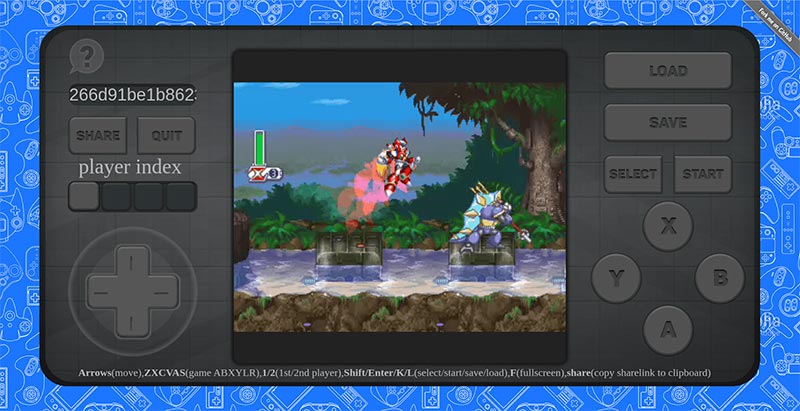
Try it at cloudretro.io
Direct play an existing game: Pokemon Emerald
Introduction
CloudRetro provides an open-source cloud gaming platform for retro games. It started as an experiment for testing cloud gaming performance with WebRTC and Libretro, and now it aims to deliver the most modern and convenient gaming experience through the technology.
Theoretically, in cloud gaming, games are run on remote servers and media are streamed to the player optimally to ensure
the most comfortable user interaction. It opens the ability to play any retro games on web-browser directly, which are
fully compatible with multi-platform like Desktop, Android, IOS.
In ideal network condition and less resource contention on servers, the game will run smoothly as in the video demo. Because I only hosted the platform on limited servers in US East, US West, Eu, Singapore, you may experience some latency issues + connection problem. You can try hosting the service following the instruction the next section to have a better sense of performance.
Feature
- Cloud gaming: Game logic and storage is hosted on cloud service. It reduces the cumbersome of game initialization. Images and audio are streamed to user in the most optimal way using advanced encoding technology.
- Cross-platform compatibility: The game is run on web browser, the most universal built-in app. No console, plugin, external app or devices are needed.
- Emulator agnostic: The game can be played directly without any extra effort to set up the gaming emulator or platform.
- Collaborate gameplay: Follow the idea of crowdplay(TwitchPlaysPokemon), multiple players can play the same game together by addressing the same deeplink. The game experience is powered by cloud-gaming, so the game is much smoother. Check CrowdPlay section
- Online multiplayer: The first time in history, you can play multiplayer on Retro games online. You can try Samurai Showndown with 2 players for fighting game example.
- Horizontally scaled: The infrastructure is designed to be able to scale under high traffic by adding more instances.
- Cloud storage: Game state is storing on online storage, so you can come back and continue playing your incomplete game later.
Development environment
- Install Go
- Install libvpx, libx264 , libopus, pkg-config , sdl2, libyuv+libjpeg-turbo
# Ubuntu / Windows (WSL2)
apt-get install -y make gcc pkg-config libvpx-dev libx264-dev libopus-dev libsdl2-dev libyuv-dev libjpeg-turbo8-dev

# MacOS
brew install pkg-config libvpx x264 opus sdl2 jpeg-turbo

# Windows (MSYS2)
pacman -Sy --noconfirm --needed git make mingw-w64-x86_64-{gcc,pkgconf,dlfcn,libvpx,opus,libx264,SDL2,libyuv,libjpeg-turbo}
(You don't need to download libyuv on macOS)
(If you need to use the app on an older version of Ubuntu that does not have libyuv (when it says: unable to locate package libyuv-dev), you can add a custom apt repository:
add sudo add-apt-repository ppa:savoury1/graphics)
Because the coordinator and workers need to run simultaneously. Workers connect to the coordinator.
- Script
make dev.run- The scripts spawns 2 processes one in the background and one in foreground
- Manual
- Need to run coordinator and worker separately in two session
go run cmd/coordinator/main.go- spawn coordinatorgo run cmd/worker/main.go --coordinatorhost localhost:8000- spawn workers connecting to coordinator
Additionally, you may install and configure an X Server display in order to be able to run OpenGL cores.
See the docker-compose.yml file for Xvfb example config.
Run with Docker
Use makefile script: make dev.run-docker or Docker Compose directly: docker compose up --build.
It will spawn a docker environment and you can access the service on localhost:8000.
Configuration
The default configuration file is stored in the pkg/configs/config.yaml file.
This configuration file will be embedded into the applications and loaded automatically during startup.
In order to change the default parameters you can specify environment variables with the CLOUD_GAME_ prefix, or place
a custom config.yaml file into one of these places: just near the application, .cr folder in user's home, or
specify own directory with -w-conf application param (worker -w-conf /usr/conf).
Deployment
See an example of deployment scripts if you want to try to host your own cloud-retro copy in the cloud. This script (deploy-app.sh) allows pushing configured application to the group of servers automatically. The cloud server should be any Debian-based system with the docker-compose application installed.
Technical documents
- Design document v2
- webrtchacks Blog: Open Source Cloud Gaming with WebRTC
- Wiki (outdated)
- Code Pointer Wiki
FAQ
Crowd Play, play game together
By clicking these deep link, you can join the game directly and play it together with other people.
And you can host the new game by yourself by accessing cloudretro.io and click "share" button to generate a permanent link to your game.
Credits
We are very much thankful to everyone we've been lucky to collaborate with and many people for help and inspiration from their awesome works.
Thanks:
- Pion team for the incredible Golang WebRTC library and their support.
- Libretro team for the greatest emulation lib.
- kivutar for go-nanoarch and ludo.
- gen2brain for the h264 and VPX encoder.
- poi5305 for the YUV video encoding.
- fogleman for the NES emulator.
Art
- October 2nd - Gameboy poltergeist by Wayne Kubiak (wanyo)
- 1978 by Simon C Page
- Linear Video game controller background Gadgets seamless pattern by Anna
Announcement
CloudMorph is a sibling project that offers a more generic to run any offline games/application on browser in Cloud Gaming approach: https://github.com/giongto35/cloud-morph)
Team
Authors:
- Nguyen Huu Thanh (https://www.linkedin.com/in/huuthanhnguyen)
- Tri Dang Minh (https://trich.im)
Maintainers:
- Sergey Stepanov (https://github.com/sergystepanov)