mirror of
https://github.com/captbaritone/webamp.git
synced 2026-01-23 10:15:31 +00:00

186 lines
10 KiB
Markdown
Executable file
186 lines
10 KiB
Markdown
Executable file
 [](https://discord.gg/fBTDMqR)
|
|
|
|
# Webamp
|
|
|
|
A reimplementation of Winamp 2.9 in HTML5 and JavaScript.
|
|
|
|
**As seen on [TechCrunch], [Motherboard], [Gizmodo], Hacker News ([1], [2], [3], [4]), and [elsewhere](./packages/webamp/docs/press.md).**
|
|
|
|
## [Give it a try!](https://webamp.org)
|
|
|
|
[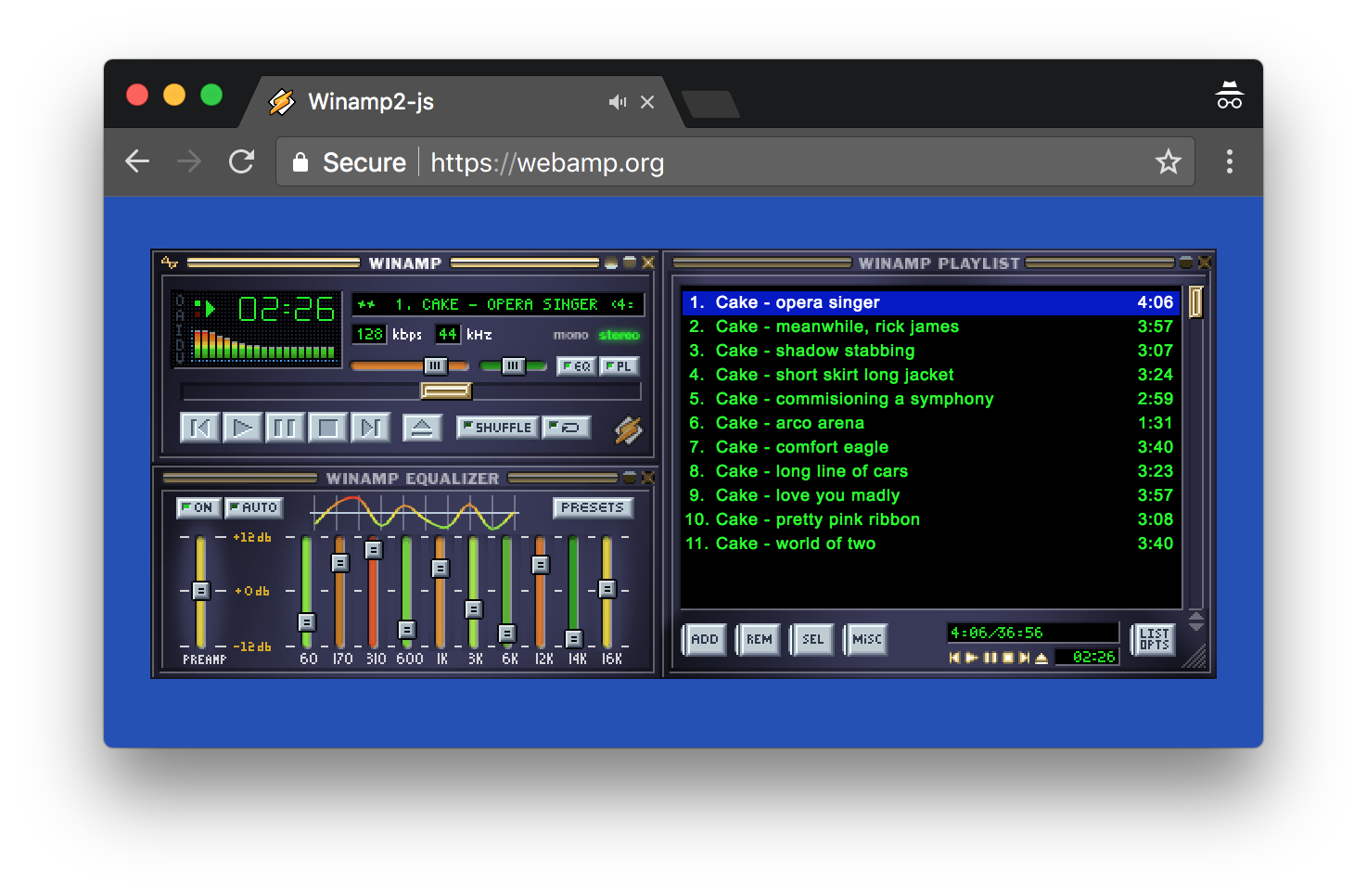](https://webamp.org)
|
|
|
|
Works in modern versions of Edge, Firefox, Safari and Chrome. IE is [not
|
|
supported](http://caniuse.com/#feat=audio-api).
|
|
|
|
## Features
|
|
|
|
Check out this Twitter thread for an illustrated list of features: https://twitter.com/captbaritone/status/961274714013319168
|
|
|
|
## Use Webamp in your own project
|
|
|
|
Its possible to use Webamp as a media player on your own website. In fact, the [Internet Archive](https://archive.org/) offers it as an optional player for all of their archived audio tracks. [Read more](https://blog.archive.org/2018/10/02/dont-click-on-the-llama/).
|
|
|
|
For examples of how to add Webamp to your projects, check out out [`examples/` directory](./examples).
|
|
|
|
See the [usage documentation](./packages/webamp/docs/usage.md) for more detailed information.
|
|
|
|
## About This Repository
|
|
|
|
This repository contains a number of different things:
|
|
|
|
1. `packages/webamp`: The code for the [Webamp NPM module](https://www.npmjs.com/package/webamp)
|
|
2. `packages/webamp/demo`: The code for the demo site which lives at [webamp.org](https://webamp.org), see the next section for more details
|
|
3. `examples`: A few small examples showing how to use the NPM module
|
|
4. `packages/*`: A few small projects that are either related to Webamp, or may some day be a part of Webamp
|
|
|
|
## About the Demo Site
|
|
|
|
The demo site, [webamp.org](https://webamp.org), uses the same interface as the NPM module but adds the following functionality by utilizing Webamp's public API
|
|
|
|
- Error reporting using [Sentry](https://sentry.io)
|
|
- Analytics using [Google Analytics](https://analytics.google.com/analytics/web/)
|
|
- Updating document's title to reflect the currently playing track
|
|
- [Media Session API](https://developer.mozilla.org/en-US/docs/Web/API/Media_Session_API) integration
|
|
|
|
Additionally, it makes use of some private Webamp APIs to add the following functionality:
|
|
|
|
- [Butterchun](https://github.com/jberg/butterchurn) integration to render [MilkDrop](https://en.wikipedia.org/wiki/MilkDrop) visualizations. We intend to make this part of the public API soon.
|
|
- "Screenshot" mode `https://webamp.org/?screenshot=1` which can be used together with [Puppeteer](https://github.com/GoogleChrome/puppeteer) to automate the generation of Winamp skin screenshots
|
|
-
|
|
|
|
## Development
|
|
|
|
I do most development by starting the demo site in dev mode and iterating that way. The following commands will install all dependencies, run an initial development build and then start a local server. Every time you save a file, it will rebuild the bundle and automatically refresh the page.
|
|
|
|
# Clone the repo
|
|
cd webamp
|
|
# __Note:__ Please use yarn over npm, since yarn will respect our `yarn.lock` file
|
|
yarn install
|
|
yarn start
|
|
|
|
`http://localhost:8080/` should automatically open in your browser.
|
|
|
|
# Run tests and lint checks
|
|
yarn test
|
|
|
|
## Building the demo site (webamp.org)
|
|
|
|
To do an optimized build of the demo site, you can run:
|
|
|
|
yarn run build
|
|
|
|
If you wish to test this build locally, run:
|
|
|
|
yarn run serve
|
|
|
|
Then open the local ip/port that is output to the console in your browser.
|
|
|
|
## Building the NPM module
|
|
|
|
The NPM module is built separately from the demo site. To build it run:
|
|
|
|
yarn run build-library
|
|
|
|
This will write files to `./built`.
|
|
|
|
## Testing
|
|
|
|
yarn test
|
|
|
|
This will run the tests the linter and the type checker.
|
|
|
|
To update snapshots run
|
|
|
|
yarn test -u
|
|
|
|
## Deploying the Demo Site
|
|
|
|
[Netlify](https://www.netlify.com/) watches GitHub for new versions of master. When a new version is seen, it is automatically built using `npm run build` and pushed to the server. Additionally, Netlify will run a build on every pull request and include a link under the heading "Deploy preview ready!". This enables easy high level testing of pull requests.
|
|
|
|
In short, deploying should be as simple as pushing a commit to master.
|
|
|
|
Additionally, if you want to fork the project, deploying should be as simple as setting up a free Netlify account.
|
|
|
|
### Advanced Usage
|
|
|
|
There are some "feature flags" which you can manipulate by passing a specially crafted URL hash. Simply supply a JSON blob after the `#` of the URL to change these settings:
|
|
|
|
- `skinUrl` (string) Url of the default skin to use. Note, this file must be served with the correct Allows Origin header.
|
|
- `audioUrl` (string) Url of the default audio file to use. Note, this file must be served with the correct Allows Origin header.
|
|
- `initialState` (object) Override the [initial Redux state](packages/webamp/js/reducers/index.ts). Values from this object will be recursively merged into the actual default state.
|
|
|
|
**Note:** These are intended mostly as development tools and are subject to change at any time.
|
|
|
|
## Community
|
|
|
|
Join our community chat on Discord: <https://discord.gg/fBTDMqR>
|
|
|
|
There are a few related projects that have communites:
|
|
|
|
- [Winamp Community Update Pack] - "New plug-ins to add additional features to Winamp as well as replacement plug-ins to provide better implementations of some of the plug-ins natively included with Winamp". ([Forum](https://getwacup.com/community/) / [Discord server](https://discord.gg/5pVTdbj))
|
|
- [Webvs](https://github.com/azeem/webvs) -
|
|
A Winamp AVS like visualization library for the web. ([Gitter chat](https://gitter.im/visbot/AVS))
|
|
|
|
## In the Wild
|
|
|
|
A list of public websites that are using Webamp:
|
|
|
|
- [Internet Archive](https://blog.archive.org/2018/10/02/dont-click-on-the-llama/) - The Internet Archive lets you preview winamp skins and listen to audio tracks using Webamp.
|
|
- [Winampify.io](https://winampify.io/) - An online Spotify client using Webamp
|
|
- [Webamp Desktop](https://desktop.webamp.org/) - An Electron app version of Webamp.
|
|
- [98.js.org](https://98.js.org/) - A Windows 98 clone in JavaScript ([GitHub](https://github.com/1j01/98))
|
|
- [winxp.now.sh](https://winxp.now.sh/) - A Windows XP clone in JavaScript with React ([GitHub](https://github.com/ShizukuIchi))
|
|
- [www.dkdomino.zone](https://www.dkdomino.zone/album.html) - Someone's personal music player.
|
|
|
|
## Reference
|
|
|
|
- [skinspecs.pdf](http://members.xoom.it/skinart/tutorial/skinspecs..pdf)
|
|
- [Skinner's Atlas 1.5 by Jellby](http://forums.winamp.com/showthread.php?p=951257)
|
|
- [Winamp Skinning Tutorial](http://people.xmms2.org/~tru/promoe/Winamp_skinning_tutorial_1_5_0.pdf)
|
|
- Sacrat Skinning tutorial parts [1](http://www.hugi.scene.org/online/hugi26/hugi%2026%20-%20graphics%20skinning%20sacrat%20winamp%20skinning%20tutorial%20-%201.htm), [2](http://www.hugi.scene.org/online/hugi26/hugi%2026%20-%20graphics%20skinning%20sacrat%20winamp%20skinning%20tutorial%20-%202.htm), [3](http://www.hugi.scene.org/online/hugi26/hugi%2026%20-%20graphics%20skinning%20sacrat%20winamp%20skinning%20tutorial%20-%203.htm), [4](http://www.hugi.scene.org/online/hugi26/hugi%2026%20-%20graphics%20skinning%20sacrat%20winamp%20skinning%20tutorial%20-%204.htm), and [5](http://www.hugi.scene.org/online/hugi26/hugi%2026%20-%20graphics%20skinning%20sacrat%20winamp%20skinning%20tutorial%20-%205.htm),
|
|
- [Winamp Wiki](http://wiki.winamp.com/wiki/Creating_Classic_Skins)
|
|
|
|
## Predecessors
|
|
|
|
- [Webamp2x](http://forums.winamp.com/showthread.php?threadid=91850) An
|
|
impressive implementation from 2002(!).
|
|
- [JsAmp](http://freecog.net/2005/jsamp/demo/MainWindow.xhtml) An implementation from 2005 by @twm (via [Hacker News](https://news.ycombinator.com/item?id=15317723)).
|
|
- [LlamaCloud Comp](https://vimeo.com/20149683) From 2011 by [Lee Martin](http://www.leemartin.com/) (via [Twitter](https://twitter.com/leemartin/status/910235793737814017))
|
|
- [Winamp em HTML5 e Javascript](http://www.tidbits.com.br/winamp-em-html5-e-javascript)
|
|
In 2010 a developer named Danilo posted one of his HTML5 experiments: "an
|
|
audio player simulating good old Winamp". You will have to download the zip
|
|
file.
|
|
- [JuicyDrop](http://cggaurav.github.io/juicydrop/) An HTML5 implementation with
|
|
less emphasis on being true to the skin, but fully featured visualizations.
|
|
@cggaurav is keeping it alive on [GitHub](https://github.com/cggaurav/juicydrop)
|
|
- [Spotiamp](https://web.archive.org/web/20160109180426/http://spotiamp.com/)
|
|
The folks at Spotify reimplemented Winamp as a frontend for Spotify. Not in a
|
|
browser, and only runs on Windows. It has since been discontinued.
|
|
|
|
## Thanks
|
|
|
|
- [Butterchurn](https://github.com/jberg/butterchurn), the amazing Mikdrop 2 WebGL implementation. Built and integrated into Webamp by: [jberg](https://github.com/jberg)
|
|
- Research and feature prototyping: @PAEz
|
|
- Beta feedback, catching many small UI inconsistencies: [LuigiHann](https://twitter.com/LuigiHann)
|
|
- Beta feedback and insider answers to obscure Winamp questions: [Darren Owen](https://twitter.com/The_DoctorO)
|
|
- Donating the `webamp` NPM module name: [Dave Eddy](http://daveeddy.com/)
|
|
|
|
Thank you to [Justin Frankel](http://www.1014.org/) and everyone at Nullsoft
|
|
for Winamp which inspired so many of us.
|
|
|
|
## License
|
|
|
|
While the Winamp name, interface, and, sample audio file are surely property of
|
|
Nullsoft, the code within this project is released under the [MIT
|
|
License](LICENSE.txt). That being said, if you do anything interesting with
|
|
this code, please let me know. I'd love to see it.
|
|
|
|
[techcrunch]: https://techcrunch.com/2018/02/09/whip-the-llamas-ass-with-this-javascript-winamp-emulator/
|
|
[motherboard]: https://motherboard.vice.com/en_us/article/qvebbv/winamp-2-mp3-music-player-emulator
|
|
[gizmodo]: https://gizmodo.com/winamp-2-has-been-immortalized-in-html5-for-your-pleasu-1655373653
|
|
[1]: https://news.ycombinator.com/item?id=8565665
|
|
[2]: https://news.ycombinator.com/item?id=15314629
|
|
[3]: https://news.ycombinator.com/item?id=16333550
|
|
[4]: https://news.ycombinator.com/item?id=17583997
|
|
[winamp community update pack]: https://getwacup.com/
|