mirror of
https://github.com/giongto35/cloud-game.git
synced 2026-01-23 02:34:42 +00:00

174 lines
9 KiB
Markdown
174 lines
9 KiB
Markdown
# CloudRetro
|
|
|
|
[](https://github.com/giongto35/cloud-game/actions?query=workflow:build)
|
|
[](https://github.com/giongto35/cloud-game/releases/latest)
|
|
|
|
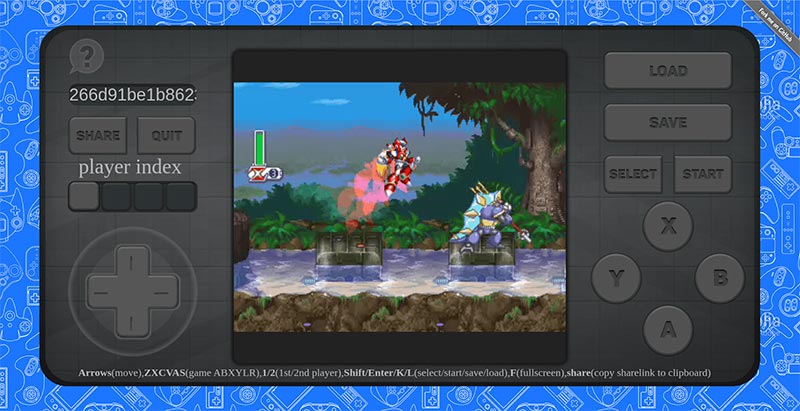
**Open-source Cloud Gaming Service For Retro Games**
|
|
**Video demo**: https://www.youtube.com/watch?v=GUBrJGAxZZg
|
|
**Technical wrapup**: https://webrtchacks.com/open-source-cloud-gaming-with-webrtc/
|
|
**CloudMorph**: [https://github.com/giongto35/cloud-morph](https://github.com/giongto35/cloud-morph): My current focus
|
|
on generic solution for cloudgaming
|
|
|
|
Discord: [Join Us](https://discord.gg/sXRQZa2zeP)
|
|
|
|
|
|
|
|
## Try it at **[cloudretro.io](https://cloudretro.io)**
|
|
|
|
Direct play an existing game: **[Pokemon Emerald](https://cloudretro.io/?id=1bd37d4b5dfda87c___Pokemon%20-%20Emerald%20Version%20(U))**
|
|
|
|
## Introduction
|
|
|
|
CloudRetro provides an open-source cloud gaming platform for retro games. It started as an experiment for testing cloud
|
|
gaming performance with [WebRTC](https://github.com/pion/webrtc/) and [Libretro](https://www.libretro.com/), and now it
|
|
aims to deliver the most modern and convenient gaming experience through the technology.
|
|
|
|
Theoretically, in cloud gaming, games are run on remote servers and media are streamed to the player optimally to ensure
|
|
the most comfortable user interaction. It opens the ability to play any retro games on web-browser directly, which are
|
|
fully compatible with multi-platform like Desktop, Android, ~~IOS~~.
|
|
|
|
In ideal network condition and less resource contention on servers, the game will run smoothly as in the video demo.
|
|
Because I only hosted the platform on limited servers in US East, US West, Eu, Singapore, you may experience some
|
|
latency issues + connection problem. You can try hosting the service following the instruction the next section to have
|
|
a better sense of performance.
|
|
|
|
## Feature
|
|
|
|
1. **Cloud gaming**: Game logic and storage is hosted on cloud service. It reduces the cumbersome of game
|
|
initialization. Images and audio are streamed to user in the most optimal way using advanced encoding technology.
|
|
2. **Cross-platform compatibility**: The game is run on web browser, the most universal built-in app. No console,
|
|
plugin, external app or devices are needed.
|
|
3. **Emulator agnostic**: The game can be played directly without any extra effort to set up the gaming emulator or
|
|
platform.
|
|
4. **Collaborate gameplay**: Follow the idea of
|
|
crowdplay([TwitchPlaysPokemon](https://en.wikipedia.org/wiki/Twitch_Plays_Pok%C3%A9mon)), multiple players can play
|
|
the same game together by addressing the same deeplink. The game experience is powered by cloud-gaming, so the game
|
|
is much smoother. [Check CrowdPlay section](#crowd-play-play-game-together)
|
|
5. **Online multiplayer**: The first time in history, you can play multiplayer on Retro games online. You can try
|
|
Samurai Showndown with 2 players for fighting game example.
|
|
5. **Horizontally scaled**: The infrastructure is designed to be able to scale under high traffic by adding more
|
|
instances.
|
|
6. **Cloud storage**: Game state is storing on online storage, so you can come back and continue playing your incomplete
|
|
game later.
|
|
|
|
## Development environment
|
|
|
|
* Install [Go](https://golang.org/doc/install)
|
|
* Install [libvpx](https://www.webmproject.org/code/), [libx264](https://www.videolan.org/developers/x264.html)
|
|
, [libopus](http://opus-codec.org/), [pkg-config](https://www.freedesktop.org/wiki/Software/pkg-config/)
|
|
, [sdl2](https://wiki.libsdl.org/Installation), [libyuv](https://chromium.googlesource.com/libyuv/libyuv/)+[libjpeg-turbo](https://github.com/libjpeg-turbo/libjpeg-turbo)
|
|
|
|
```
|
|
# Ubuntu / Windows (WSL2)
|
|
apt-get install -y make gcc pkg-config libvpx-dev libx264-dev libopus-dev libsdl2-dev libyuv-dev libjpeg-turbo8-dev libspeexdsp-dev
|
|
|
|
# MacOS
|
|
brew install pkg-config libvpx x264 opus sdl2 jpeg-turbo speexdsp
|
|
|
|
# Windows (MSYS2)
|
|
pacman -Sy --noconfirm --needed git make mingw-w64-ucrt-x86_64-{gcc,pkgconf,dlfcn,libvpx,opus,libx264,SDL2,libyuv,libjpeg-turbo,speexdsp}
|
|
```
|
|
|
|
(You don't need to download libyuv on macOS)
|
|
|
|
(If you need to use the app on an older version of Ubuntu that does not have libyuv (when it says: unable to locate package libyuv-dev), you can add a custom apt repository:
|
|
`add sudo add-apt-repository ppa:savoury1/graphics`)
|
|
|
|
Because the coordinator and workers need to run simultaneously. Workers connect to the coordinator.
|
|
|
|
1. Script
|
|
|
|
* `make dev.run`
|
|
* The scripts spawns 2 processes one in the background and one in foreground
|
|
|
|
2. Manual
|
|
|
|
* Need to run coordinator and worker separately in two session
|
|
* `go run cmd/coordinator/main.go` - spawn coordinator
|
|
* `go run cmd/worker/main.go --coordinatorhost localhost:8000` - spawn workers connecting to coordinator
|
|
|
|
__Additionally, you may install and configure an `X Server` display in order to be able to run OpenGL cores.__
|
|
__See the `docker-compose.yml` file for Xvfb example config.__
|
|
|
|
## Run with Docker
|
|
|
|
Use makefile script: `make dev.run-docker` or Docker Compose directly: `docker compose up --build`.
|
|
It will spawn a docker environment and you can access the service on `localhost:8000`.
|
|
|
|
## Configuration
|
|
|
|
The default configuration file is stored in the [`pkg/configs/config.yaml`](pkg/config/config.yaml) file.
|
|
This configuration file will be embedded into the applications and loaded automatically during startup.
|
|
In order to change the default parameters you can specify environment variables with the `CLOUD_GAME_` prefix, or place
|
|
a custom `config.yaml` file into one of these places: just near the application, `.cr` folder in user's home, or
|
|
specify own directory with `-w-conf` application param (`worker -w-conf /usr/conf`).
|
|
|
|
## Deployment
|
|
|
|
See an example of [deployment scripts](.github/workflows/cd) if you want to try to host your own cloud-retro copy in the
|
|
cloud. This script (deploy-app.sh) allows pushing configured application to the group of servers automatically. The
|
|
cloud server should be any Debian-based system with the docker-compose
|
|
application [installed](https://docs.docker.com/compose/install/).
|
|
|
|
## Technical documents
|
|
|
|
- [Design document v2](DESIGNv2.md)
|
|
- [webrtchacks Blog: Open Source Cloud Gaming with WebRTC](https://webrtchacks.com/open-source-cloud-gaming-with-webrtc/)
|
|
- [Wiki (outdated)](https://github.com/giongto35/cloud-game/wiki)
|
|
- [Code Pointer Wiki](https://github.com/giongto35/cloud-game/wiki/Code-Deep-Dive)
|
|
|
|
## FAQ
|
|
|
|
- [FAQ](https://github.com/giongto35/cloud-game/wiki/FAQ)
|
|
|
|
## Crowd Play, play game together
|
|
|
|
By clicking these deep link, you can join the game directly and play it together with other people.
|
|
|
|
- [Play Pokemon Emerald](https://cloudretro.io/?id=652e45d78d2b91cd___Pokemon%20-%20Emerald%20Version%20(U))
|
|
- [Fire Emblem](https://cloudretro.io/?id=314ea4d7f9c94d25___Fire%20Emblem%20%28U%29%20%5B%21%5D)
|
|
- [Samurai Showdown 4](https://cloudretro.io/?id=733c73064c368832___samsho4)
|
|
- [Metal Slug X](https://cloudretro.io/?id=2a9c4b3f1c872d28___mslugx)
|
|
|
|
And you can host the new game by yourself by accessing [cloudretro.io](https://cloudretro.io) and click "share" button
|
|
to generate a permanent link to your game.
|
|
|
|
## Credits
|
|
|
|
We are very much thankful to [everyone](https://github.com/giongto35/cloud-game/graphs/contributors) we've been lucky to
|
|
collaborate with and many people for help and inspiration from their awesome works.
|
|
|
|
Thanks:
|
|
|
|
* [Pion](https://github.com/pion) team for the incredible Golang WebRTC library and their support.
|
|
* [Libretro](https://www.libretro.com) team for the greatest emulation lib.
|
|
* [kivutar](https://github.com/kivutar) for [go-nanoarch](https://github.com/libretro/go-nanoarch)
|
|
and [ludo](https://github.com/libretro/ludo).
|
|
* [gen2brain](https://github.com/gen2brain) for the [h264](https://github.com/gen2brain/x264-go) and VPX encoder.
|
|
* [poi5305](https://github.com/poi5305) for the [YUV video encoding](https://github.com/poi5305/go-yuv2webRTC).
|
|
* [fogleman](https://github.com/fogleman) for the [NES emulator](https://github.com/fogleman/nes).
|
|
|
|
#### Art
|
|
|
|
* [October 2nd - Gameboy poltergeist](https://www.deviantart.com/wanyo/art/October-2nd-Gameboy-poltergeist-707754217)
|
|
by [Wayne Kubiak (wanyo)](https://www.deviantart.com/wanyo)
|
|
* [1978](http://simoncpage.co.uk/blog/2009/01/retro-art-wallpaper/) by [Simon C Page](http://simoncpage.co.uk/)
|
|
* [Linear Video game controller background Gadgets seamless pattern](https://stock.adobe.com/ru/images/linear-video-game-controller-background-gadgets-seamless-pattern/241143639)
|
|
by [Anna](https://stock.adobe.com/contributor/208277224/anna)
|
|
|
|
# Announcement
|
|
|
|
**[CloudMorph](https://github.com/giongto35/cloud-morph) is a sibling project that offers a more generic to
|
|
run any offline games/application on browser in Cloud Gaming
|
|
approach: [https://github.com/giongto35/cloud-morph](https://github.com/giongto35/cloud-morph))**
|
|
|
|
## Team
|
|
|
|
Authors:
|
|
|
|
- Nguyen Huu Thanh (https://www.linkedin.com/in/huuthanhnguyen)
|
|
- Tri Dang Minh (https://trich.im)
|
|
|
|
Maintainers:
|
|
|
|
- Sergey Stepanov (https://github.com/sergystepanov)
|